How to Build a Production-Ready RAG System: A Practical Guide
Retrieval-augmented generation looks easy in a demo and hard in production. Here's the architecture, the trade-offs and the checklist we use to build RAG that customers actually rely on.
⚡ Key takeaways
- Most RAG failures are retrieval failures, not model failures.
- Combine keyword and vector search, then rerank — it’s the single biggest quality lever.
- Build an evaluation set on day one; you can’t improve what you don’t measure.
- Treat permissions, citations and freshness as core features, not afterthoughts.
Almost every team we talk to has a RAG prototype. Someone connected a vector database to a large language model over a weekend, pointed it at the company wiki, and the first demo was magical. Then real users arrived — with vague questions, outdated documents and data they shouldn’t be able to see — and the magic faded fast.
The gap between a RAG demo and a RAG product is mostly engineering discipline. In this guide we walk through the architecture and practices we use when building retrieval-augmented systems for clients, and the mistakes we see most often along the way.
Why RAG, and why it breaks
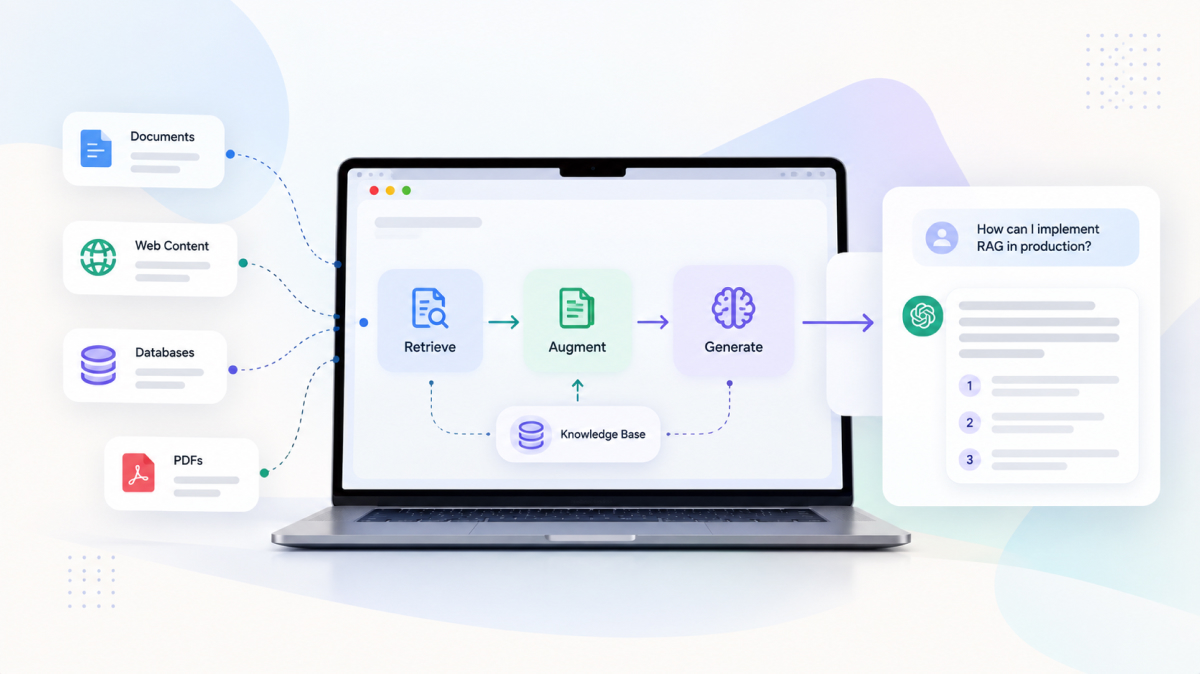
Retrieval-augmented generation solves a simple problem: language models don’t know your private data, and their knowledge goes stale. Instead of retraining a model, you retrieve relevant passages from your own content at question time and pass them to the model as context. The model then answers based on what it was given.
It sounds straightforward, but each step hides a failure mode:
- The right document never gets retrieved — because it was chunked badly, or the user’s wording doesn’t match the document’s wording.
- The right document is retrieved but buried under less relevant passages, so the model ignores it.
- The model answers beyond the context, filling gaps with confident-sounding guesses.
- The answer is correct but untrustworthy, because users can’t see where it came from.
If your RAG system gives a bad answer, look at what it retrieved before you blame the model. Nine times out of ten, that’s where the problem is. — A rule of thumb our AI team lives by
The reference architecture
A production RAG system has two halves. The offline indexing pipeline turns raw content into something searchable. The online query path turns a user’s question into a grounded answer. Evaluation and monitoring wrap around both.
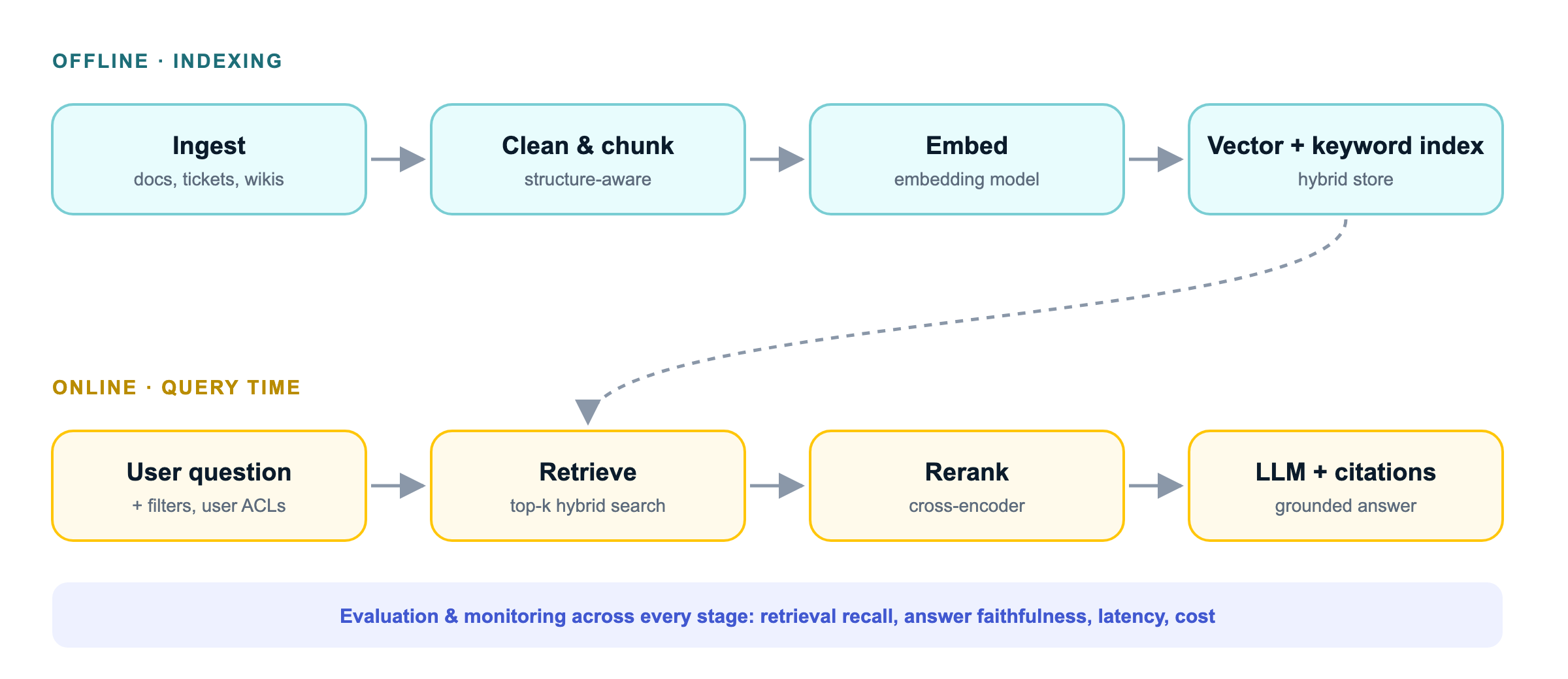
Keeping these halves separate matters. It lets you re-index content without touching the query path, swap embedding models behind a version flag, and scale each side independently.
Chunking is a product decision
How you split documents into chunks determines what your system can find. Fixed-size chunks of a few hundred tokens are a fine starting point, but they regularly cut tables in half and separate a heading from the paragraph that explains it.
Better results usually come from structure-aware chunking: split on headings, sections and list boundaries, and carry useful metadata along with each chunk.
# Structure-aware chunking with metadata (simplified)
def chunk_document(doc):
    chunks = []
    for section in doc.sections:
        for part in split_by_tokens(section.text, max_tokens=400, overlap=50):
            chunks.append({
                "text": f"{doc.title} › {section.heading}\n\n{part}",
                "source_url": doc.url,
                "updated_at": doc.updated_at,
                "allowed_groups": doc.acl,   # enforce permissions at query time
            })
return chunksHybrid retrieval and reranking
Pure vector search is great at meaning but weak at exact terms — product codes, error messages, names. Keyword search (BM25) is the opposite. Running both and merging the results gives you the best of each.
Then add a reranker: a model that scores each candidate passage against the question more carefully than the initial search can. Retrieve generously (say, the top 30–50), rerank, and pass only the best handful to the LLM.
| Approach | Strengths | Weaknesses |
|---|---|---|
| Vector search | Understands paraphrase and intent | Misses exact terms, IDs and rare words |
| Keyword (BM25) | Precise on exact terms; cheap and fast | Fails when wording differs from the source |
| Hybrid + rerank | Best overall relevance in most real-world content | Extra latency and cost per query |
Don’t forget permissions
If different users can see different documents, filter by access rights during retrieval — never after generation. Once restricted text reaches the model’s context, you’ve already leaked it.
Grounding and citations
A good RAG answer is one users can verify. Instruct the model to answer only from the supplied context, to say “I don’t know” when the context doesn’t cover the question, and to cite the passages it used. Then render those citations as clickable links in your UI.
Citations do double duty: they build user trust, and they make debugging dramatically easier, because you can see exactly which source drove each answer.
Planning a RAG or AI assistant project?
Our AI team can review your architecture or build it with you end to end.
Evaluate before you ship
The teams that succeed with RAG treat it like any other software: with tests. Start with a small, honest evaluation set — 50 to 100 real questions, each paired with the document that should answer it and a reference answer.
Measure two things separately:
- Retrieval quality — did the right passage appear in the top results? (recall@k, MRR)
- Answer quality — is the answer faithful to the retrieved context, and does it actually answer the question?
Run the evaluation on every change to chunking, embeddings, prompts or models. It turns “I think it’s better” into a number you can defend, and it stops silent regressions from reaching users.
Production checklist
Before you put a RAG system in front of customers, make sure you can tick every box below:
- Incremental re-indexing when source content changes, with stale content removed.
- Hybrid retrieval with reranking, tuned on your own evaluation set.
- Access control enforced at retrieval time.
- Answers grounded in context, with visible citations and a graceful “I don’t know”.
- Logging of queries, retrieved chunks and answers (with PII handled appropriately).
- Dashboards for latency, cost per query, and user feedback.
- An automated evaluation run in CI for every pipeline change.
RAG isn’t a single component you install; it’s a system you engineer. Get retrieval right, measure relentlessly, and design for trust from day one — and the demo magic can survive contact with real users.